Free AI Caption Generator: Add Animated Subtitles to Video Online
CapMagic Studio is a free AI caption generator that runs entirely in your browser. Auto-transcribe English speech, style word-by-word animated captions for TikTok, Instagram Reels and YouTube Shorts, and export an SRT file or a video with the captions burned in. Your video is never uploaded.
Open the caption studio to select a video (MP4, MOV, MKV or WebM, up to 250 MB and 10 minutes).
How it works
- Upload your video. Select any MP4, MOV, MKV or WebM video. It stays in your browser's memory and is never sent to a server.
- Auto-caption with AI. Whisper AI transcribes English speech with word-level timing on your device. Review and fix the transcript in the built-in editor.
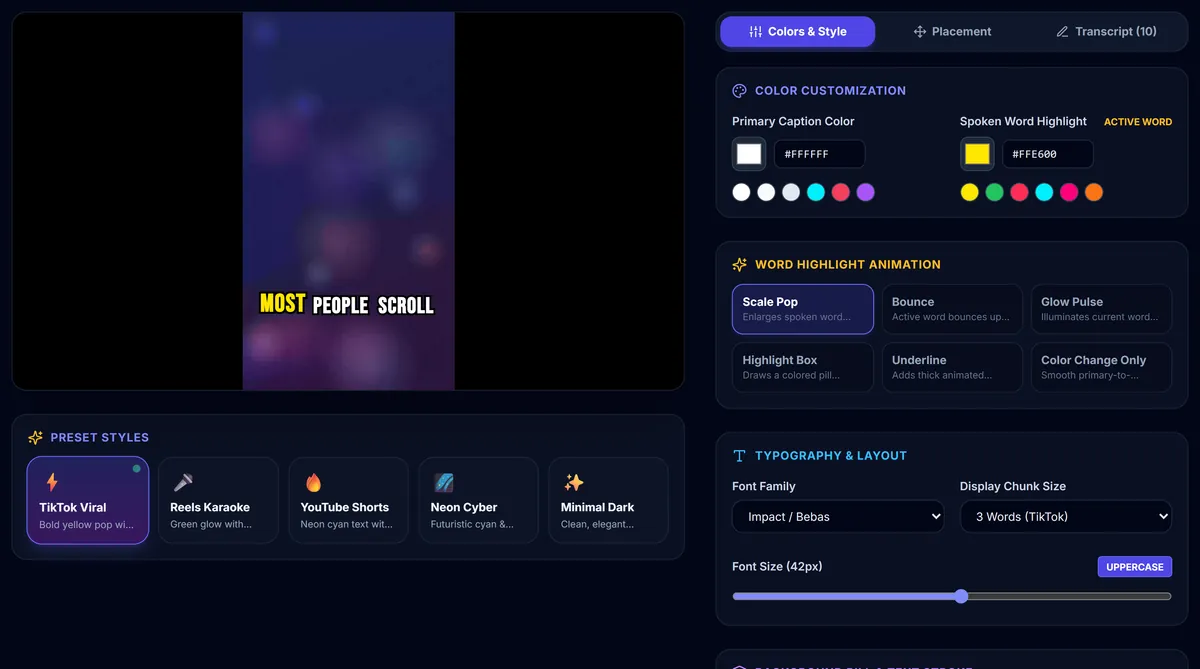
- Style and export. Pick a preset such as TikTok Viral or Reels Karaoke, adjust fonts, colours and position, then burn the captions into the video or download an SRT file.
Why CapMagic Studio
- 100% client-side privacy: transcription and video export run on your device using WebAssembly.
- No sign-up and free: no account, no subscription and no watermark on exported videos.
- Karaoke word highlighting: spoken words glow, scale or pop in time with the speech.
- Two export modes: download a standard SRT subtitle file, or an MP4 with captions burned in (Chrome and Edge; WebM in other browsers).
Frequently asked questions
Is my video uploaded?
No. The video is read directly from your device, and speech recognition runs in your browser, so your footage never leaves your computer.
Is CapMagic Studio really free?
Yes. There are no subscriptions, sign-ups or hidden fees, and exported videos have no watermark.
Which languages are supported?
Automatic transcription currently works for English speech. You can paste a script or import an SRT file in any language and style it the same way.
Which formats can I export?
An SRT subtitle file for YouTube, Premiere Pro, DaVinci Resolve or Final Cut Pro, or a finished video with the captions burned in.